

Chapter 58: Creating Headers and Footers
Chapter Description
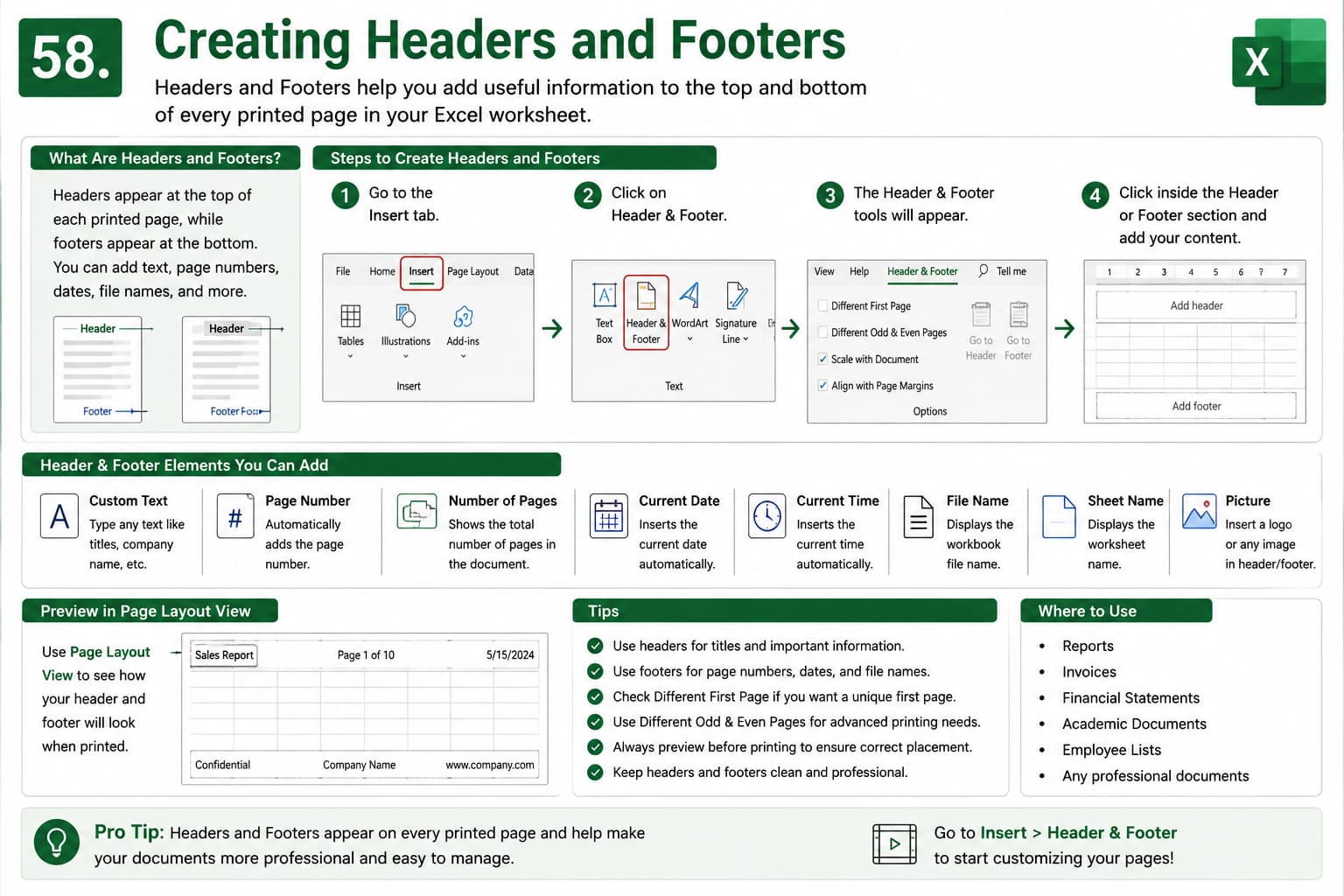
In this chapter, you’ll learn how to create and customize Headers and Footers in Microsoft Excel to add professional information to printed worksheets. Headers and footers allow you to display important details such as page numbers, dates, file names, sheet names, company names, logos, and custom text at the top or bottom of every printed page.
You’ll also explore Excel’s built-in header and footer elements, learn how to insert custom content, and understand how these features improve the appearance and organization of reports, invoices, financial statements, and other business documents.
This lesson is essential for anyone who wants to create polished, print-ready Excel worksheets with consistent and professional page layouts.
What You’ll Learn
- Understanding headers and footers in Microsoft Excel
- Creating custom headers and footers
- Adding page numbers and total page count
- Inserting the current date and time automatically
- Displaying file names and worksheet names
- Adding images or company logos to headers and footers
- Using different headers and footers for the first page and odd/even pages
- Previewing headers and footers before printing
- Best practices for professional document formatting
Learning Outcome
By the end of this chapter, you’ll be able to confidently create and customize Headers and Footers in Microsoft Excel. You’ll know how to add page numbers, dates, file information, and custom text, giving your printed worksheets a professional appearance while improving document organization and readability.

