

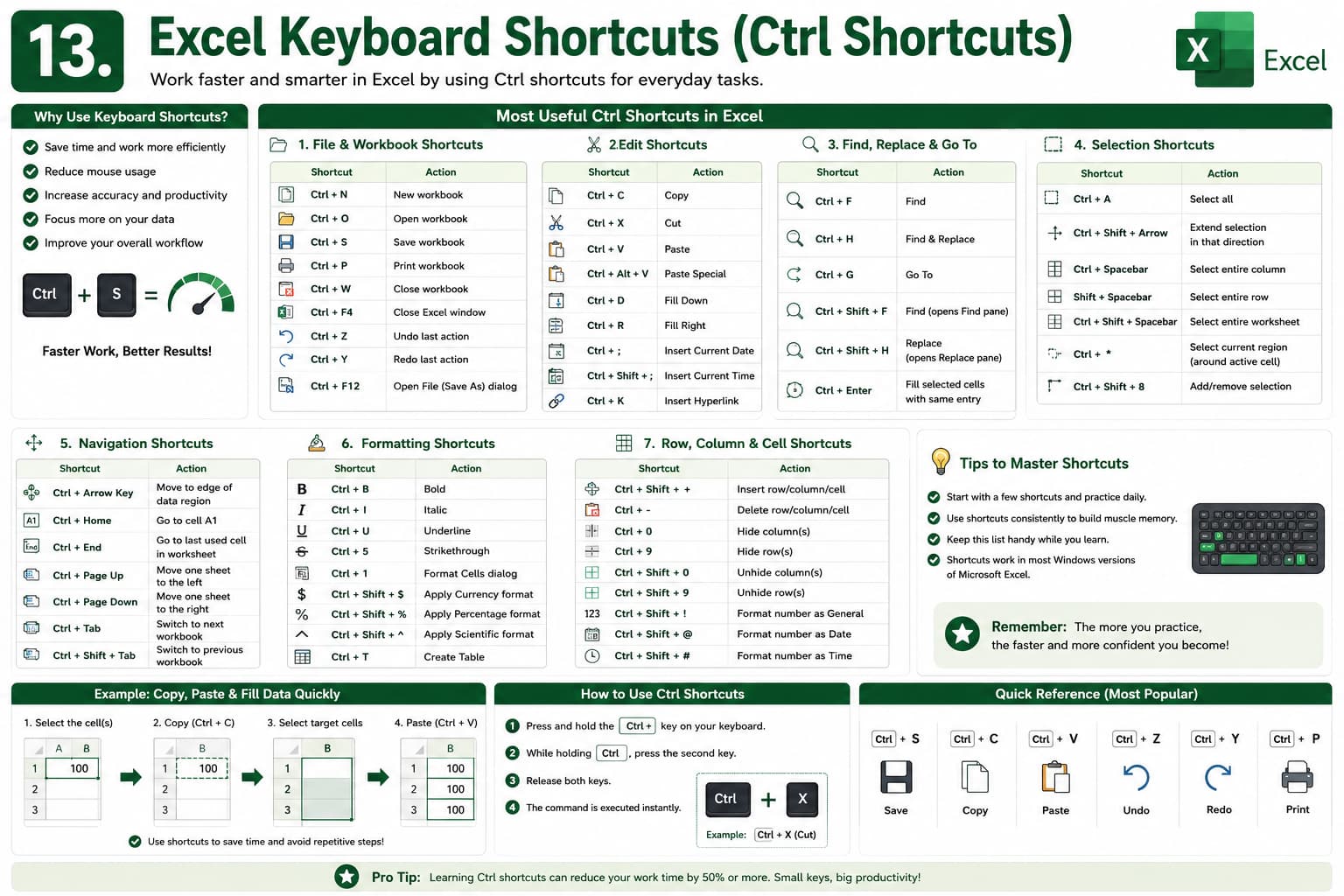
Chapter 13: Excel Keyboard Shortcuts (Ctrl Shortcuts)
Chapter Description
In this chapter, you’ll learn the most useful Ctrl keyboard shortcuts in Microsoft Excel to improve your productivity and work more efficiently. Keyboard shortcuts help you perform common tasks such as copying, pasting, saving, formatting, selecting data, and navigating worksheets without relying on the mouse.
These shortcuts are essential for beginners and advanced Excel users who want to speed up their daily workflow.
What You’ll Learn
- Common Ctrl keyboard shortcuts
- Copy, Cut, and Paste shortcuts
- Undo and Redo commands
- Save and Print shortcuts
- Selecting cells quickly
- Formatting shortcuts
- Navigation shortcuts
- Productivity tips for faster Excel work
Learning Outcome
By the end of this chapter, you’ll be able to use essential Ctrl keyboard shortcuts confidently, increasing your speed, accuracy, and efficiency while working in Microsoft Excel.

