

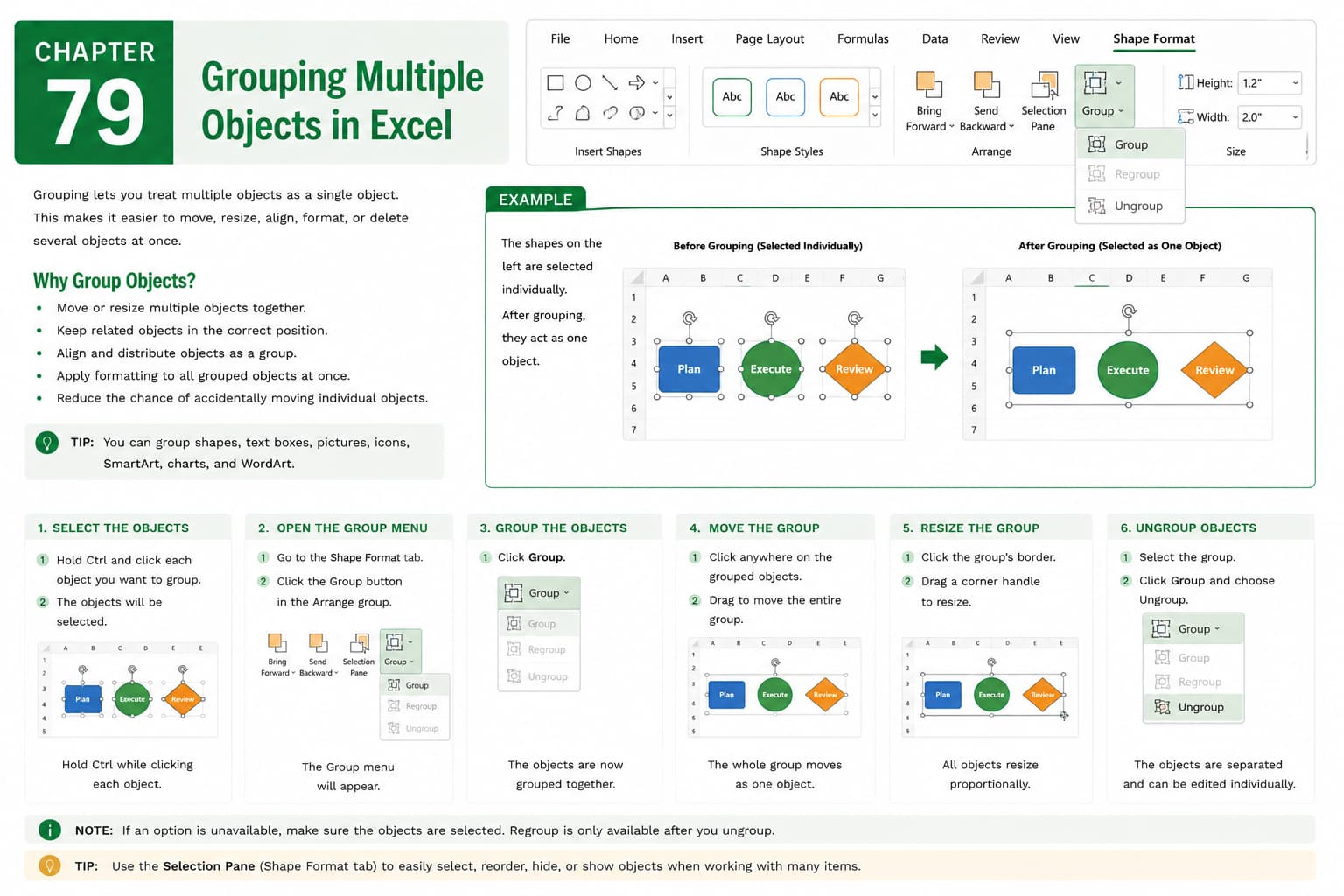
Chapter 79: Grouping Multiple Objects in Excel
Chapter Description
In this chapter, you’ll learn how to group multiple objects in Microsoft Excel to manage and arrange worksheet elements more efficiently. Grouping allows you to combine shapes, pictures, icons, text boxes, and other objects into a single unit, making it easier to move, resize, align, and format them together.
You’ll explore how to select multiple objects, group and ungroup them, edit grouped objects, and apply formatting to the entire group. You’ll also learn how grouping can help create professional dashboards, reports, and presentations with a clean and organized layout.
This lesson is especially useful for designing business dashboards, creating flowcharts, preparing reports, building organizational charts, and enhancing worksheet presentations.
What You’ll Learn
- Understanding object grouping in Microsoft Excel
- Selecting multiple worksheet objects
- Grouping shapes, images, icons, and text boxes
- Moving and resizing grouped objects
- Formatting grouped objects simultaneously
- Ungrouping and editing individual objects
- Organizing worksheet layouts efficiently
- Best practices for working with grouped objects
Learning Outcome
By the end of this chapter, you’ll be able to confidently group and manage multiple objects in Microsoft Excel, making it easier to organize, edit, and format worksheet elements. You’ll create more polished, professional, and visually appealing spreadsheets with greater efficiency.

