

Chapter 27: Removing Duplicate Values in Excel
Chapter Description
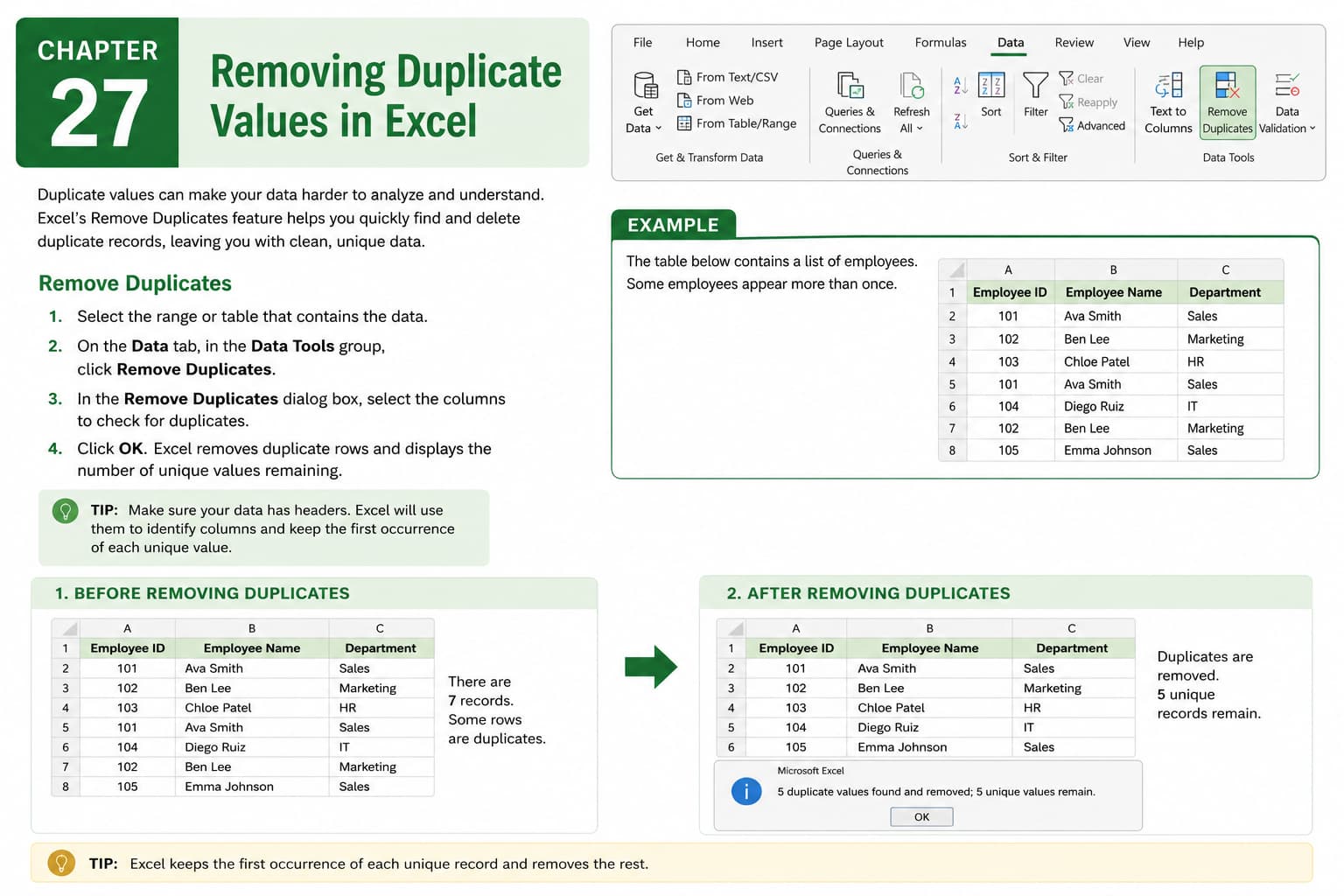
In this chapter, you’ll learn how to remove duplicate values in Microsoft Excel to keep your data clean, accurate, and organized. Duplicate entries can lead to incorrect analysis, reporting errors, and inconsistencies in your worksheets. Excel’s built-in Remove Duplicates feature makes it easy to identify and eliminate repeated records while preserving unique data.
You’ll explore how to remove duplicates from a single column or multiple columns, understand how Excel determines duplicate records, and learn best practices for cleaning large datasets before analysis.
This lesson is especially useful for managing customer lists, employee databases, sales records, inventory data, contact lists, and financial reports.
What You’ll Learn
- Understanding duplicate data in Microsoft Excel
- Using the Remove Duplicates feature
- Removing duplicates from single and multiple columns
- Selecting columns for duplicate comparison
- Preserving unique records
- Verifying data after removing duplicates
- Avoiding common mistakes during data cleanup
- Best practices for maintaining accurate datasets
Learning Outcome
By the end of this chapter, you’ll be able to confidently remove duplicate values in Microsoft Excel, ensuring your worksheets remain accurate, organized, and free from redundant data. You’ll improve data quality, streamline analysis, and create reliable reports for business and personal use.

