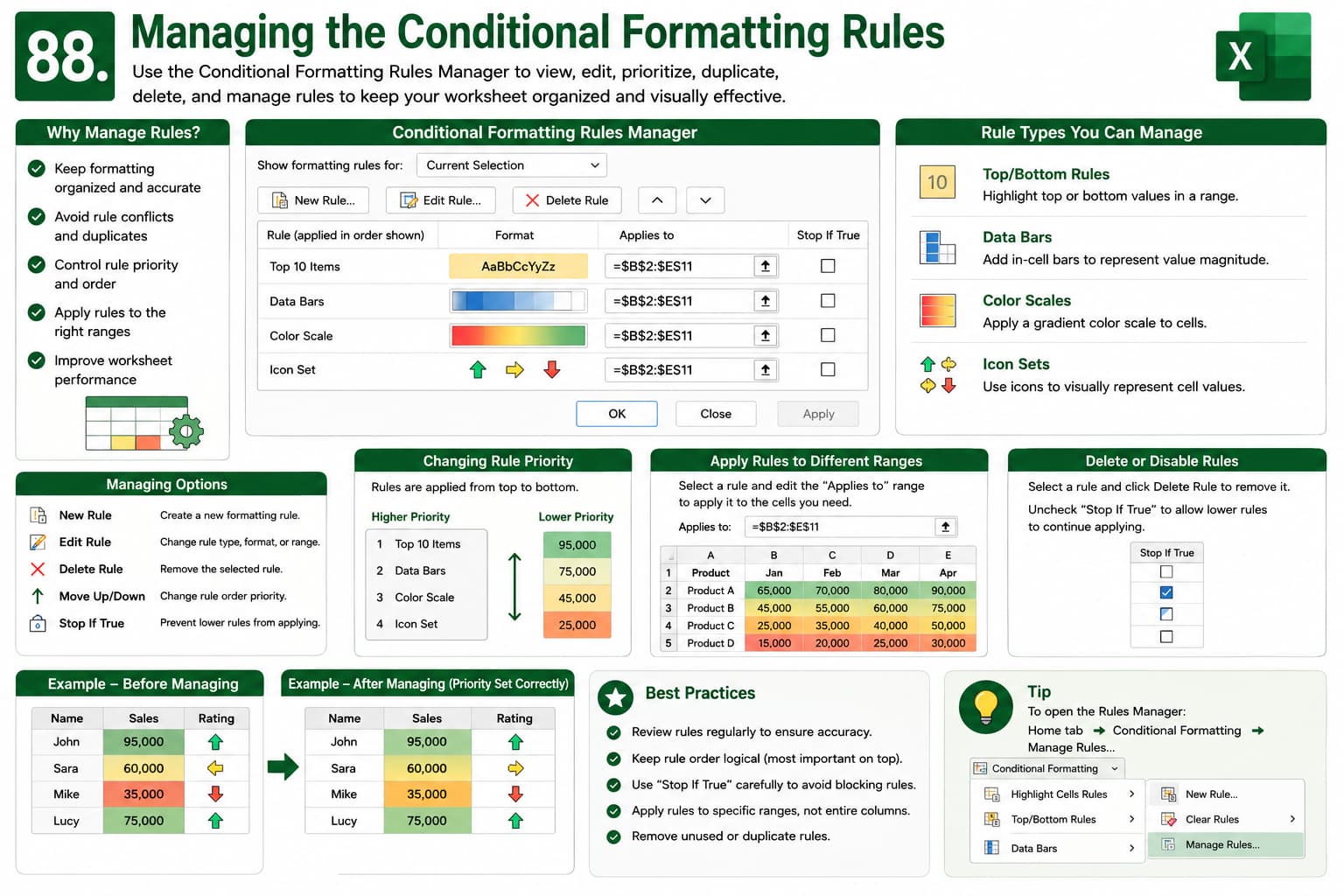
Chapter 88: Managing the Conditional Formatting Rules
Chapter Description
In this chapter, you’ll learn how to manage Conditional Formatting rules in Microsoft Excel to keep your worksheets organized, accurate, and visually effective. As spreadsheets grow, multiple formatting rules can overlap or conflict. Excel’s Conditional Formatting Rules Manager helps you view, edit, prioritize, duplicate, and delete rules with ease.
This lesson is especially useful for dashboards, financial reports, sales analysis, inventory tracking, and any worksheet that uses conditional formatting to highlight important data.
What You’ll Learn
- Understanding the Conditional Formatting Rules Manager
- Viewing existing formatting rules
- Editing conditional formatting rules
- Changing rule priority and order
- Applying rules to different cell ranges
- Deleting unwanted formatting rules
- Managing multiple conditional formatting rules
- Best practices for effective conditional formatting
Learning Outcome
By the end of this chapter, you’ll be able to confidently manage Conditional Formatting rules in Microsoft Excel. You’ll organize, edit, prioritize, and troubleshoot formatting rules to create professional and easy-to-read spreadsheets.

