

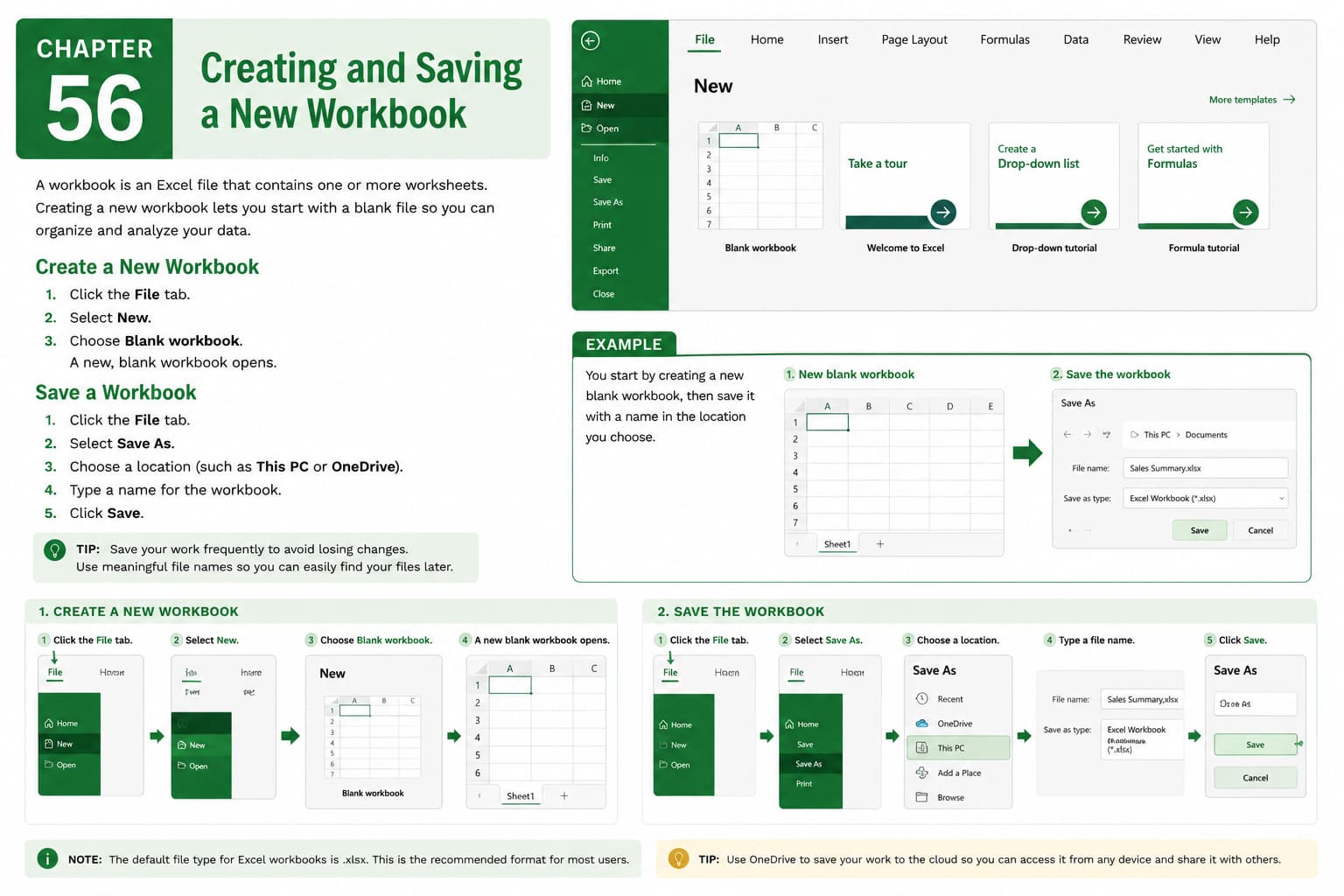
Chapter 56: Creating and Saving a New Workbook
Chapter Description
In this chapter, you’ll learn how to create and save a new workbook in Microsoft Excel, providing the foundation for organizing and managing your data. A workbook serves as the main Excel file that can contain one or more worksheets for storing information, performing calculations, and creating reports.
You’ll explore how to create a blank workbook, use built-in templates, save workbooks in different file formats, choose appropriate storage locations, and apply best practices for naming and organizing your files. You’ll also learn how AutoSave and Save As can help protect your work and manage different versions of a workbook.
This lesson is especially useful for creating budgets, invoices, financial reports, project trackers, inventory records, schedules, and other business or personal spreadsheets.
What You’ll Learn
- Understanding workbooks in Microsoft Excel
- Creating a new blank workbook
- Creating a workbook from a template
- Saving a workbook for the first time
- Using the Save and Save As commands
- Choosing different Excel file formats
- Naming and organizing workbook files
- Best practices for saving and managing workbooks
Learning Outcome
By the end of this chapter, you’ll be able to confidently create and save new workbooks in Microsoft Excel, organize your files effectively, and ensure your data is stored securely for future use. You’ll be equipped to start new spreadsheet projects with confidence and manage them efficiently.

